HOWTO: Entering your registration code into BPFTP Client for MacOS
BPFTP Client for MacOS has been retired and is no longer offered for download.
If it is already installed on your Mac, this HOWTO shows how to enter your registration code.
For Windows, see BulletProof FTP Client.
Start BulletProof FTP Client from your desktop or Applications folder.
REGISTERING
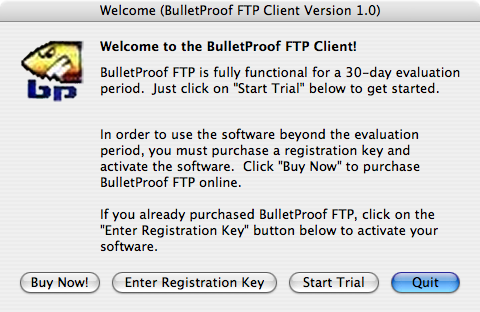
If you have purchased the software, but have not entered your "Registry Key"; a dialog box will pop-up labeled "Welcome (BulletProof FTP Client Version 1.0)" and there will be four buttons at the bottom labeled "Buy Now!", "Enter Registry Key", "Start Trial" and "Quit".
- Click the button labeled "Enter Registry Key".
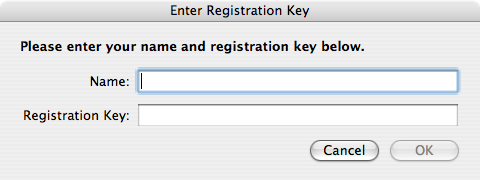
- A dialog box will will pop-up labeled "Enter Registration Key" and there will be two fields awaiting your input. These fields are labeled "Name" and "Registry Key".
- Now open your email and find the email you received from "automated@builtbp.com" with the subject of "Full Version: BulletProof FTP Client for Mac", scroll down and you will find a block of text with the words "Registration Information" and two values "Name" and "Key".
- Position both the email you just found with the lines labeled "Name" and "Key" and the dialog box labeled "Enter Registration Key", so that you can see them at the same time.
- Using your mouse, highlight the letters/numbers after the word "Name:" and COPY (Command Key + C) them to the clipboard. Now move your mouse over to the dialog box "Enter Registry Key" and PASTE (Command Key + V) these letters/numbers into the field labeled "Name". Look carefully at the values which have been entered and make sure they are exactly the same as the values in the email. Make sure there is not a space before/after any of the letters and you didn't accidentally get the colon. If they are not the same, correct them so that they match.
- Using your mouse, highlight the letters/numbers after the word "Key:" and COPY/PASTE them, like you did in the previous step into the field labeled "Registration Key". Again, look carefully at the values which have been entered and make sure they are exactly the same. Correct any mistakes.
- Click the button labeled "OK".
Please Note: If any errors are encountered, a dialog-box will pop-up labeled "Invalid Registration Key". This means that the values entered are not EXACTLY the same as what's in the email. You should click the OK button and try again. Every registration-code sent from our servers is double-checked with a copy of the program and they are guaranteed to work. If you get frustrated trying to enter the characters, please take a break, go get something refreshing and try again. It will work, we promise!
